 Robofy
 WhatsApp Consent Management
Manage WhatsApp Opt-Ins, Opt-Outs, and Subscription Status
Give customers a simple way to update their messaging preference. Configure keywords, let matching replies update subscription status, and keep the current preference with each contact in Robofy.
For teams managing WhatsApp contacts, campaigns, and customer messaging preferences.
Consent signal Live illustration
Contact becomes UnsubscribedPreference updated
Contact becomes SubscribedPreference updated
Preference saved Contact ManagementRobofy keeps the current preference with the contact.
Import fallback status Configurable opt-in & opt-out keywords Preference saved with the contact
What Is WhatsApp Consent Management?
WhatsApp consent management in Robofy lets you manage whether a contact is marked Subscribed or Unsubscribed. Choose a fallback status for imports, configure opt-out and opt-in keywords, and keep the current preference in Contact Management.
When an incoming message matches a configured keyword, Robofy updates that contact’s subscription status.
Inside Robofy
Control Subscription Preferences From One Place
Three settings define how imported values and incoming replies become a contact’s recorded preference.
Consent Settings
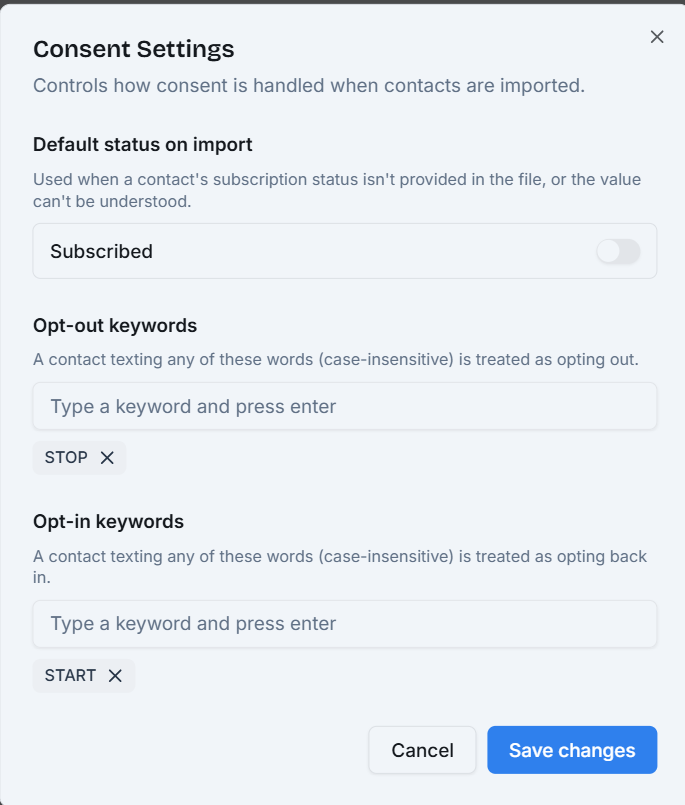
From reply to preference
A Simple Reply Can Update a Contact’s Preference
With STOP and START configured, customers can opt out and opt back in. The complete reply must match; letter case and surrounding spaces do not matter.
- SubscribedCurrent preference
- STOPConfigured opt-out reply
- UnsubscribedUpdated preference
- STARTConfigured opt-in reply
- SubscribedSubscribed again
A whole-reply match.
A clear status change.
Robofy normalises the complete reply, then compares it with your configured keywords.
Examples cycle automatically. Hover or focus one to pause on its result. No message is sent.
Complete incoming reply
“STOP”Ignore surrounding spaces & letter case
STOPMatches STOP Unsubscribed
The opt-out keyword matches. Robofy records the contact as Unsubscribed.
Opt-out signalIncoming WhatsApp replySTOP received
- Rule
- Configured opt-out keyword
- Contact status
- Unsubscribed
Contact ManagementIllustration
AS
Alex Smith
Example contact- Phone
- +1 202 555 0142
- alex@example.com
- Subscription status
- Unsubscribed
Connected to the contact
Keep the Current Preference With the Contact
The subscription preference is stored with the contact in Robofy Contact Management. When a configured keyword matches an incoming reply, that contact’s status is updated.
Contact details and the current subscription preference belong together, so your team can see how the contact is recorded.
Explore WhatsApp Contact Management When contacts are imported
Decide How Imported Contacts Are Treated
A recognised subscription value takes priority. Missing, blank, or unrecognised values use the fallback configured in Consent Settings.
Fallback ruleMissing values use UnsubscribedRecognised values keep their original meaning.
Import resolution preview
| Imported value | Rule used | Recorded status |
|---|---|---|
| Yes / True / 1 | Recognised | ✓ Subscribed |
| No / False / 0 | Recognised | − Unsubscribed |
| Missing | Fallback | − Unsubscribed |
| Blank | Fallback | − Unsubscribed |
| Unrecognised | Fallback | − Unsubscribed |
Missing, blank, and unrecognised values use Unsubscribed. Recognised values stay unchanged.
Set Up WhatsApp Consent Management in Four Steps
Choose how preferences are recorded, then check both directions with a test contact.
- 01
Open Consent Settings
Start with the import default and keyword lists in Robofy.
- 02
Choose the import fallback
Select Subscribed or Unsubscribed for missing, blank, or unrecognised values.
- 03
Add opt-out and opt-in keywords
Enter the complete replies you want customers to use, then save your changes.
- 04
Test both directions
Send a configured opt-out reply, then an opt-in reply. Check each resulting status in Contact Management.
FAQ
Frequently Asked Questions
Straightforward answers about WhatsApp consent management in Robofy.
What does Robofy Consent Management do?
Robofy Consent Management records whether a WhatsApp contact is subscribed or unsubscribed. You can choose a fallback status for imported contacts and configure opt-out and opt-in keywords. When a complete incoming reply matches a configured keyword, Robofy updates the subscription status stored with that contact in Contact Management.
How do WhatsApp opt-out keywords work?
You configure the replies that mark a contact unsubscribed, such as STOP or UNSUBSCRIBE. Robofy ignores surrounding spaces and letter case, then matches the complete incoming WhatsApp reply against your configured keywords. If STOP is configured, “stop” matches. “Please stop messaging me” does not match merely because it contains that word.
Can I choose my own opt-in and opt-out keywords?
Yes. Add your chosen replies to the opt-out and opt-in keyword lists in Consent Settings. For example, you could configure STOP and UNSUBSCRIBE for opting out, and START and SUBSCRIBE for opting back in. The examples on this page illustrate configured keywords; they are not a claim that those words are universal built-in defaults.
Are opt-in and opt-out keywords case-sensitive?
No. Keyword matching is case-insensitive, and surrounding spaces are ignored. With STOP configured as an opt-out keyword, STOP, stop, and “ STOP ” all match. The complete reply still needs to match a configured keyword. Extra words are not ignored, and keyword matching does not infer the intent of a longer sentence.
What happens when an imported contact has no subscription status?
Robofy applies the fallback you choose in Consent Settings: Subscribed or Unsubscribed. The fallback also applies to blank or unrecognised imported subscription values. Recognised values take priority: Yes, True, and 1 map to Subscribed; No, False, and 0 map to Unsubscribed. Changing the fallback does not override a recognised imported value.
Can a contact subscribe again after opting out?
Yes. A contact can send a complete incoming WhatsApp reply matching one of your configured opt-in keywords, such as START. Robofy then updates the contact’s subscription status to Subscribed. Matching ignores letter case and surrounding spaces, and the current subscription preference is stored with the contact in Contact Management.
Does a subscribed status automatically prove consent to message someone?
No. Subscribed is a recorded status in Robofy. Importing a phone number or choosing Subscribed does not by itself establish the permission required for every message. Businesses should keep the permission information they rely on, explain what customers are subscribing to, and honour stop requests. Consent Management should not be treated as proof of legal consent or a guarantee of suppression across every sending path.
WhatsApp Consent ManagementMake WhatsApp Preferences
Make WhatsApp Preferences
Easier to Manage
Set clear import defaults, let configured customer replies update subscription status, and keep each contact’s current preference in Robofy.